Feature · Strings
Every string checked against the inverter datasheet.
The designer calculates voltage and current for every string, suggests the longest strings the limits allow and shows the string plan on the roof. You see why the strings look the way they do, MPPT by MPPT.
What is checked
- −25 °C
- Voc is corrected with the panel’s temperature coefficient for Voc. The string Voc must not exceed the inverter’s maximum DC input voltage.
- 70 °C
- Vmp is corrected with the temperature coefficient of power. The string has to stay above the lower limit of the MPPT window on a hot summer day.
- MPPT
- Number of strings per input, and short-circuit current against the input’s limit.
Longest and shortest string
n_max = ⌊U_DC,max / Voc(−25 °C)⌋ n_min = ⌈U_MPPT,min / Vmp(70 °C)⌉- Voc(−25 °C) = Voc × (1 + TK_Voc/100 × (−25 − 25)), with Voc and TK_Voc (per cent per degree) from the panel datasheet.
- Vmp(70 °C) = Vmp × (1 + TK_Pmax/100 × (70 − 25)). The designer calculates Vmp with the temperature coefficient of power.
- U_DC,max is the inverter’s maximum DC input voltage. U_MPPT,min is the lowest voltage at which the MPPT operates: the usable value when the datasheet gives one, otherwise the lower limit of the window.
- Without optimisers, Vmp at −25 °C should also stay below the upper limit of the MPPT window; otherwise output is limited in cold weather.
String automatically
The String automatically button divides the panels into as few and as long strings as the limits allow: higher voltage, fewer strings. A roof orientation is only split when a single string would break a limit. If all the panels on a roof face fit in one string, you get one string, not two short ones.
Panels are grouped by orientation. Roof faces that differ by no more than 8 degrees in azimuth and 6 degrees in pitch may share a string. The others get their own strings and, where there are enough MPPTs, their own inputs. Parallel strings on the same MPPT are made equal in length, and the current per input is kept within the datasheet limit.
The string runs row by row from the eaves, each row in the opposite direction to the one before, so that the jumps between rows fall at the row ends. On a flat roof with an east–west system the string follows the back-to-back rows, and an array split by a maintenance walkway is strung array by array.
When the limits force a choice
- First: as many panels as possible in strings.
- One orientation per MPPT. Different orientations share an MPPT only when there are not enough inputs, and then with a warning.
- As few and as long strings as possible.
- Separate MPPTs before parallel strings on the same MPPT, when there are spare inputs.
- If an orientation has to be split, it becomes one string per roof face if the faces fit separately, otherwise the most even split possible.
The explanation, MPPT by MPPT
Below the button there is one line per MPPT: number of strings, panels per string and the string Voc at −25 °C against the inverter’s maximum voltage. When several strings run in parallel, the current against the input limit is shown too.
If a roof orientation is split into several strings, the reason is given – for example that all the panels in one string would give a Voc above the limit. If you have split an orientation yourself that would fit in one string, the explanation says so. Panels that did not fit are listed with the reason, for example that the inverter has no more string inputs.
Drawing the strings yourself
New string
Creates an empty string with a name (S1, S2 …) and an MPPT that can be changed in the list.
Draw string
Click the panels in the order the cable will run. A panel that is already in another string moves to this one.
Edit
Click a panel that is already in the string, and the string is cut at that panel. Backspace removes the last panel, Enter finishes.
Check
The list shows the panel count, cold Voc and hot Vmp for each string, with OK or the problem in plain words.
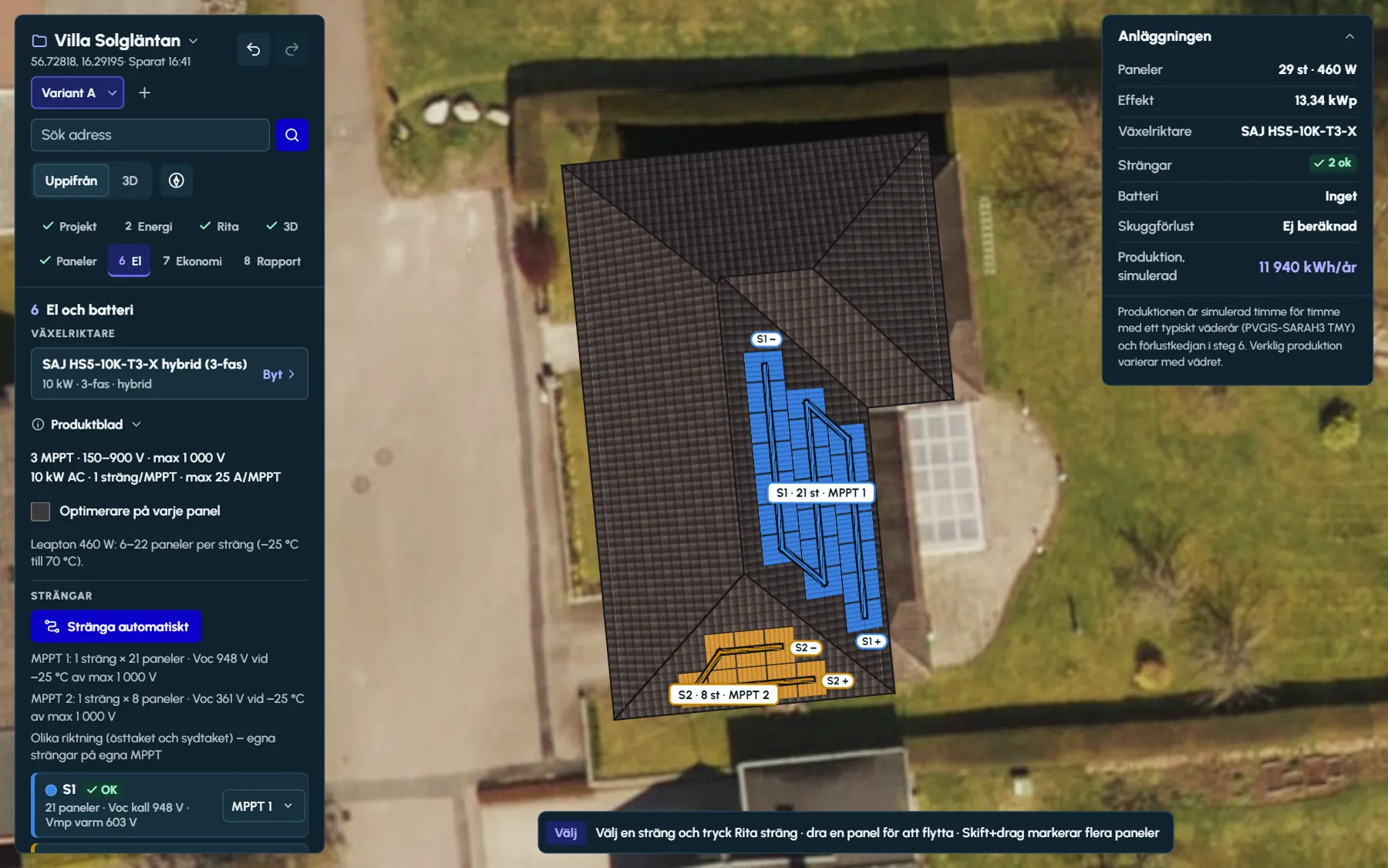
The string plan: one colour per string
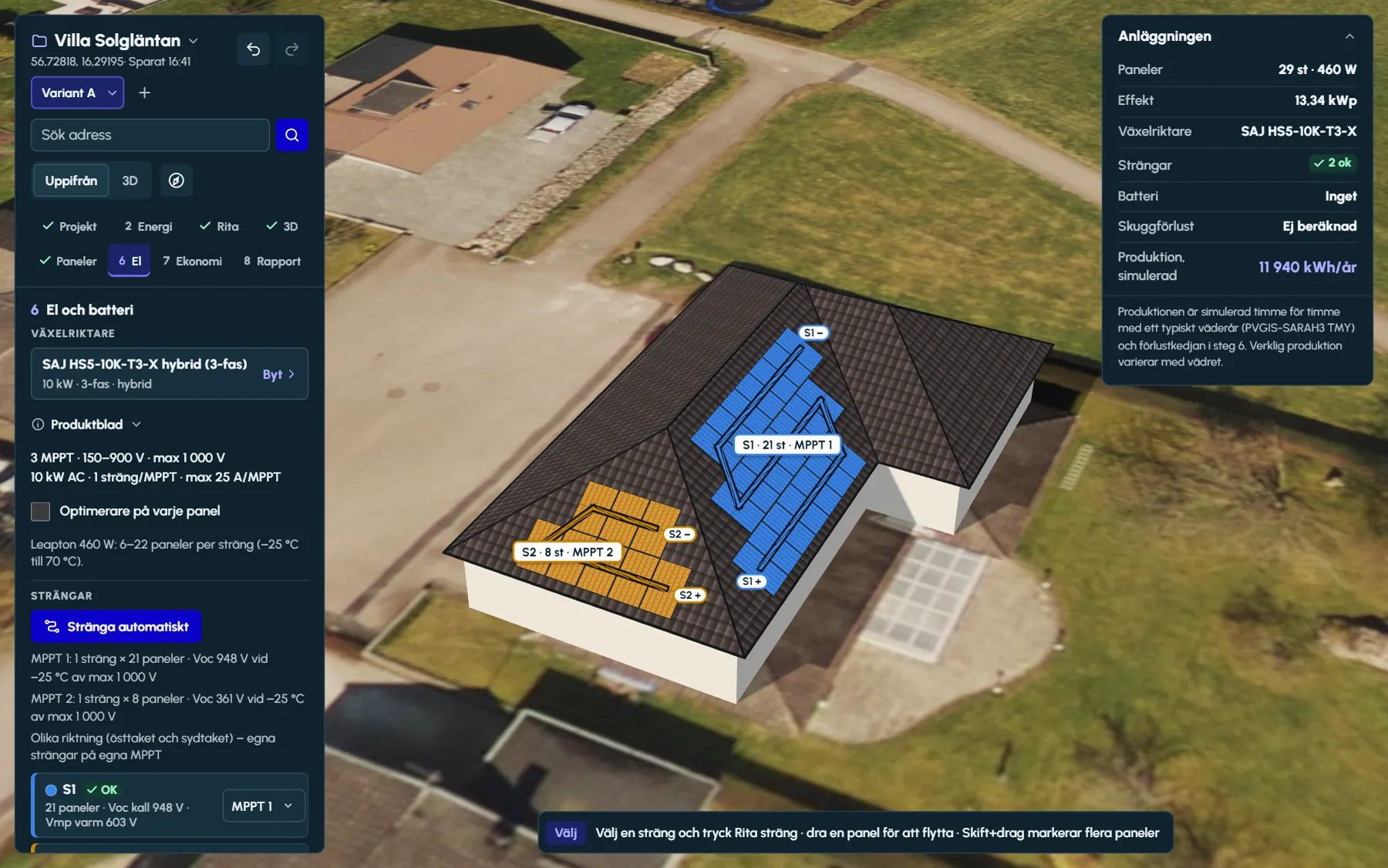
In step 6 each panel takes its string’s colour on the glass, so the string is visible without following a line. The line is drawn on top with a dark outline and shows how the string is connected from plus to minus. Where the cable runs between rows, it is drawn as a dashed arc out from the array.
Each string has a label with its name, panel count and MPPT, and plus and minus at the ends. Hover over a panel and the whole string is highlighted while the others fade. A selected string shows the order 1, 2, 3 … on the panels, and panels without a string are grey.
- Eight colours, and a label on every string so that they can be told apart without the colour. From the ninth string on, the colours repeat with a pattern.
- The same string plan appears at the full level of the PDF report, with the table of string voltages.
Optimisers
The Optimisers on every panel checkbox changes the rules. Only the Voc limit per string then applies, and the requirements for minimum length and equal string lengths per MPPT are dropped. In the simulation each panel is calculated on its own, with a one per cent loss in the optimiser. Inverters that require optimisers are marked as such in the product picker.
The system check also warns about
- A DC/AC ratio above 1.5 (a lot of power is clipped) or below 0.8 (the inverter is oversized).
- Panel power above the inverter’s maximum DC power, when the datasheet gives it.
- Panels that are not in any string.
- A string that mixes roof faces with different orientations – the weakest panel limits the whole string.
- Strings of different lengths on the same MPPT.
Questions and answers
Questions and answers
At what temperature does Ritwerk calculate Voc?
At −25 °C. The open-circuit voltage is corrected with the panel’s Voc temperature coefficient from the datasheet, and the string Voc is compared with the inverter’s maximum DC input voltage. Vmp is checked at a cell temperature of 70 °C against the lower limit of the MPPT window.
Why did I get one long string instead of two short ones?
String automatically picks as few and as long strings as the limits allow, because that gives a higher string voltage and fewer strings. A roof orientation is only split when a single string would break the Voc limit or the MPPT window, and the explanation below the button says why.
Can the east and west roofs be in the same string?
Not in automatic stringing. Roof faces may share a string when their azimuth differs by no more than 8 degrees and their pitch by no more than 6 degrees. If you draw a mixed string by hand, the check warns that the weakest panel limits the whole string.
How do I move a panel to another string?
Select the string the panel should go to, press Draw string and click the panel. It is taken out of its old string and added at the end of the selected one, and the check is recalculated for both strings.
How are optimisers handled?
Tick Optimisers on every panel in step 6. Only the Voc limit per string is then checked, and the requirements for minimum length and equal string lengths are dropped. The simulation then calculates each panel’s output on its own.
Read next
- String sizing and Voc in the coldThe most and fewest panels per string, worked out step by step with real datasheets.
- Ritwerk vs SolarEdge DesignerTwo web tools – one built for SolarEdge systems, the other independent of the manufacturers.
- Ritwerk vs PV*SOL premiumA Windows program with a large database versus a browser-based solar designer with the loads in the drawing.
- Component library570 products with search by power, favourites, product sheets and a link to the manufacturer’s datasheet.
Try it on a real roof.
The designer opens in your browser, with no account. Search for an address and start drawing.