Comparison
Ritwerk and SolarEdge Designer, side by side.
Both run in the browser and build a 3D model of the roof. The difference lies in which systems the tools are built for and what carries through to the mounting.
Updated
What SolarEdge Designer is
SolarEdge Designer is SolarEdge’s own web tool for houses and commercial roofs. You sign in with the same credentials as for SolarEdge’s monitoring portal. The tool builds a 3D model of the roof from a satellite image, detects the roof automatically and suggests inverters and power optimisers while you draw.
The bill of materials can be downloaded as a PDF or a spreadsheet and sent to the SolarEdge distributor when you order. Since June 2026, Designer can also size SolarEdge’s commercial battery CSS-OD based on the roof area, the load profile and the customer’s goals.
SolarEdge’s current product page blocks automated reading. The table is therefore based on SolarEdge’s marketing and news pages about Designer, which date from 2020–2022, and on a press release from June 2026. Details that appear only on the product page are not included.
Side by side
| Ritwerk | SolarEdge Designer | |
|---|---|---|
| Runs in | The browser, on a computer and iPad, with no account | The browser, sign-in with a SolarEdge account |
| Components | Register of 570 products (120 panel models, 415 inverters, 35 batteries) from many manufacturers, with product sheets and datasheets; you can add your own panels | Built for SolarEdge systems; suggests inverters and power optimisers. Size of the database: not stated |
| Base data | Aerial imagery from Esri; the outline is traced on the photo and Inner edges raises the roof in 3D | Satellite image turned into a 3D model, automatic roof detection with AI, DXF import |
| Shading | The sun’s path every month plus sky view, at nine points per panel; the loss per panel | Shading analysis, including from trees drawn in with their dimensions |
| Strings | Longest strings within Voc at −25 °C, Vmp at 70 °C and the current per MPPT, with an explanation | Automatic stringing, validation against SolarEdge’s design rules |
| Yield data | PVGIS 5.3 from the European Commission, simulated hour by hour | A weather station is chosen in the project; the source is not stated on the vendor’s public pages |
| Mounting and loads | Snow and wind loads to the Swedish BFS 2024:6 in the designer: zones, fixings and largest c/c spacing for 12 systems from Nordmount, SOLTOP and Weland; ballast in the manufacturer’s software | Placement rules for racking, row spacing and distance to roof edges; snow and wind loads: not stated |
| Battery | Battery sizing tests every size hour by hour; control by hourly price in SE1–SE4 | Battery in the design, sizing of the C&I battery CSS-OD; consumption profile |
| For the customer | PDF report in A4 at three levels, with a 3D view, strings, yield, shading and economics | Sales proposal with financial analysis and ROI, bill of materials as PDF or spreadsheet |
| Interface | Swedish, English and German | Not stated |
| Price | Designer at no cost; Pro €49 per user per month excl. VAT, with volume discount (pre-order) | No charge |
The details on SolarEdge Designer come from the vendor’s own pages and were checked on 14 November 2026; the sources are listed at the end of the page. "Not stated" means the detail could not be verified there. The Ritwerk column describes the designer as it is today.
When SolarEdge Designer is the better fit
When the system is to be built with SolarEdge inverters and optimisers. Designer is built for exactly those systems: the inverter and optimiser suggestions and the validation against SolarEdge’s design rules happen while you draw, and the approved design can be transferred to SolarEdge’s monitoring portal.
The tool costs nothing and includes battery sizing for SolarEdge’s commercial battery. If your company works mainly with SolarEdge, the tool follows the manufacturer’s own rules all the way to the order.
When Ritwerk is the better fit
When your company installs several brands. The register holds 415 inverters and 35 batteries from Fronius, Huawei, SMA, SolarEdge, Sungrow and GoodWe, among others, and every string is checked against the inverter’s datasheet: Voc at −25 °C against the maximum input voltage, Vmp at 70 °C against the MPPT window and the current per input.
The mounting is part of the same drawing. Choose a system from Nordmount, SOLTOP or Weland, enter the ground snow load and the reference wind speed, and the designer calculates the fixings and the largest c/c spacing per zone to the Swedish BFS 2024:6. Yield comes from PVGIS 5.3 and is set against the customer’s consumption hour by hour.
The strings, checked against the datasheet
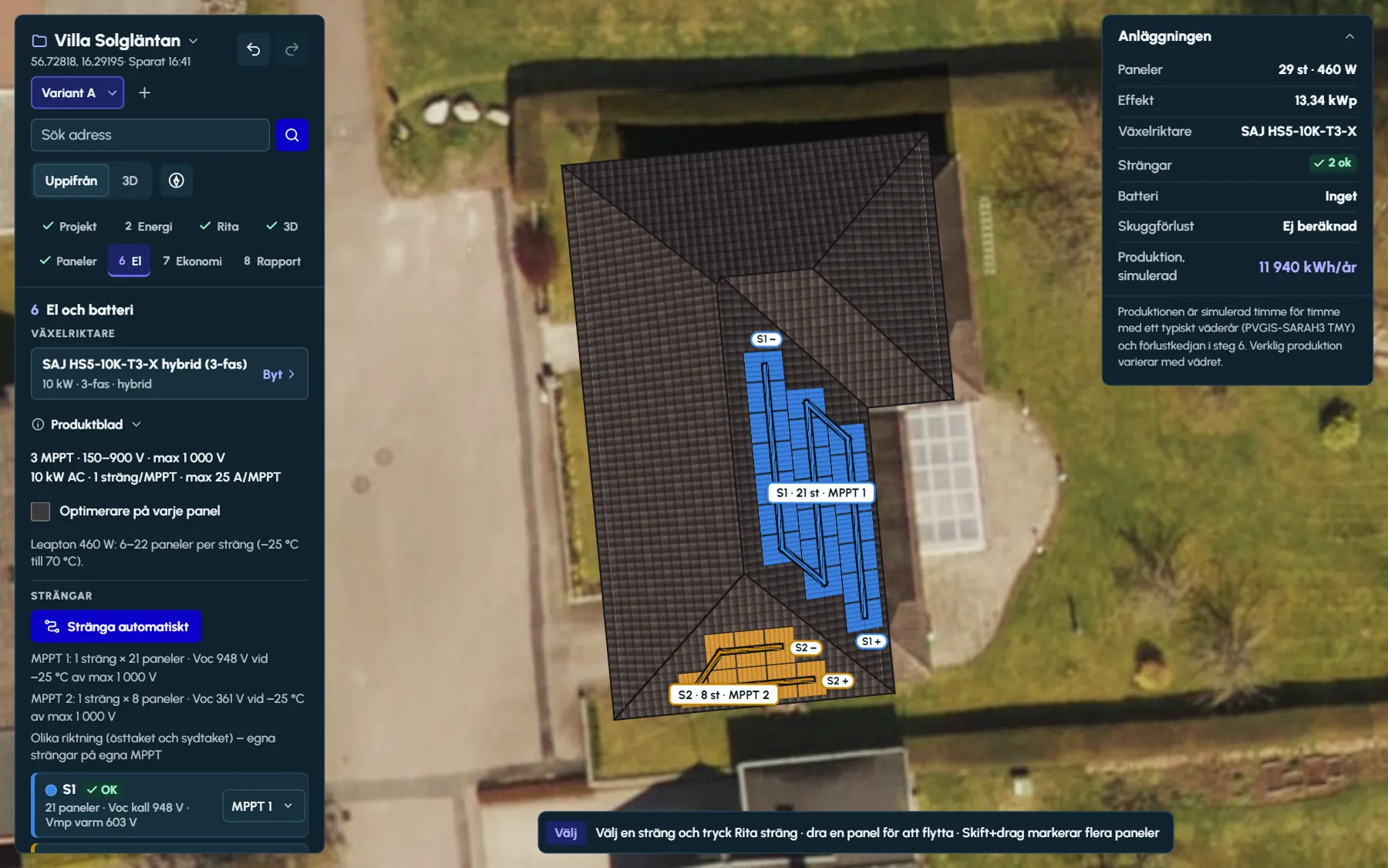
String automatically lays out as few and as long strings as the inverter’s limits allow and explains why, MPPT by MPPT. Each string shows its cold Voc and hot Vmp.
You can also draw the strings yourself and move a panel to another string with a click. With the Optimisers on every panel checkbox ticked, the designer calculates each panel on its own.
Sources
- SolarEdge – SolarEdge Designer (marketing page) – checked 14 November 2026
- SolarEdge – Designer, news February 2022 (roof detection, trees, stringing, DXF) – checked 14 November 2026
- SolarEdge – Designer, news February 2022 in Swedish (DXF export for mounting planning) – checked 14 November 2026
- SolarEdge – Designer, news August 2021 (components, weather station) – checked 14 November 2026
- SolarEdge – Designer, news July 2021 (roof and ground mounting, economics) – checked 14 November 2026
- SolarEdge – Designer, news August 2022 (placement rules) – checked 14 November 2026
- SolarEdge – Designer, news August 2021 (consumption profile, export to monitoring) – checked 14 November 2026
- SolarEdge – Design, installation and commissioning (sign-in) – checked 14 November 2026
- SolarEdge – presentation on Designer, November 2020 (French, PDF) – checked 14 November 2026
- SolarEdge – press release 23 June 2026 (battery sizing for CSS-OD) – checked 14 November 2026
Questions and answers
Questions and answers
Does SolarEdge Designer cost anything?
No. SolarEdge describes Designer as a web tool at no cost. It requires sign-in with a SolarEdge account, using the same credentials as for SolarEdge’s monitoring portal.
Can SolarEdge Designer be used with other brands of inverter?
SolarEdge describes Designer as built for SolarEdge systems, with the tool suggesting inverters and power optimisers. Which other brands are in the database is not stated on SolarEdge’s public pages.
Are SolarEdge inverters and optimisers available in Ritwerk?
Yes. SolarEdge inverters are in the register, and in step 6 you tick Optimisers on every panel. The Voc limit is then checked per string, and the simulation calculates the output of each panel on its own.
Does SolarEdge Designer calculate snow and wind loads?
That is not stated on the SolarEdge pages we could read. SolarEdge describes placement rules for racking, row spacing and distance to roof edges, and says the design can be exported as DXF for further work, including on the mounting.
Read next
- String designVoc at −25 °C, Vmp at 70 °C, current per MPPT – and the longest strings the limits allow.
- Component library570 products with search by power, favourites, product sheets and a link to the manufacturer’s datasheet.
- Mounting and loadsSnow and wind loads to BFS 2024:6: wind zones, fixings per panel and the largest c/c spacing per roof face.
Try it on a real roof.
The designer opens in your browser, with no account. Search for an address and start drawing.