Feature · Economics
One price to the customer. Savings and payback from it.
In step 7 you enter what the customer pays, on one line. The designer works out the savings per year from the energy calculation and the payback period from that price – and the same figures carry through the whole project.
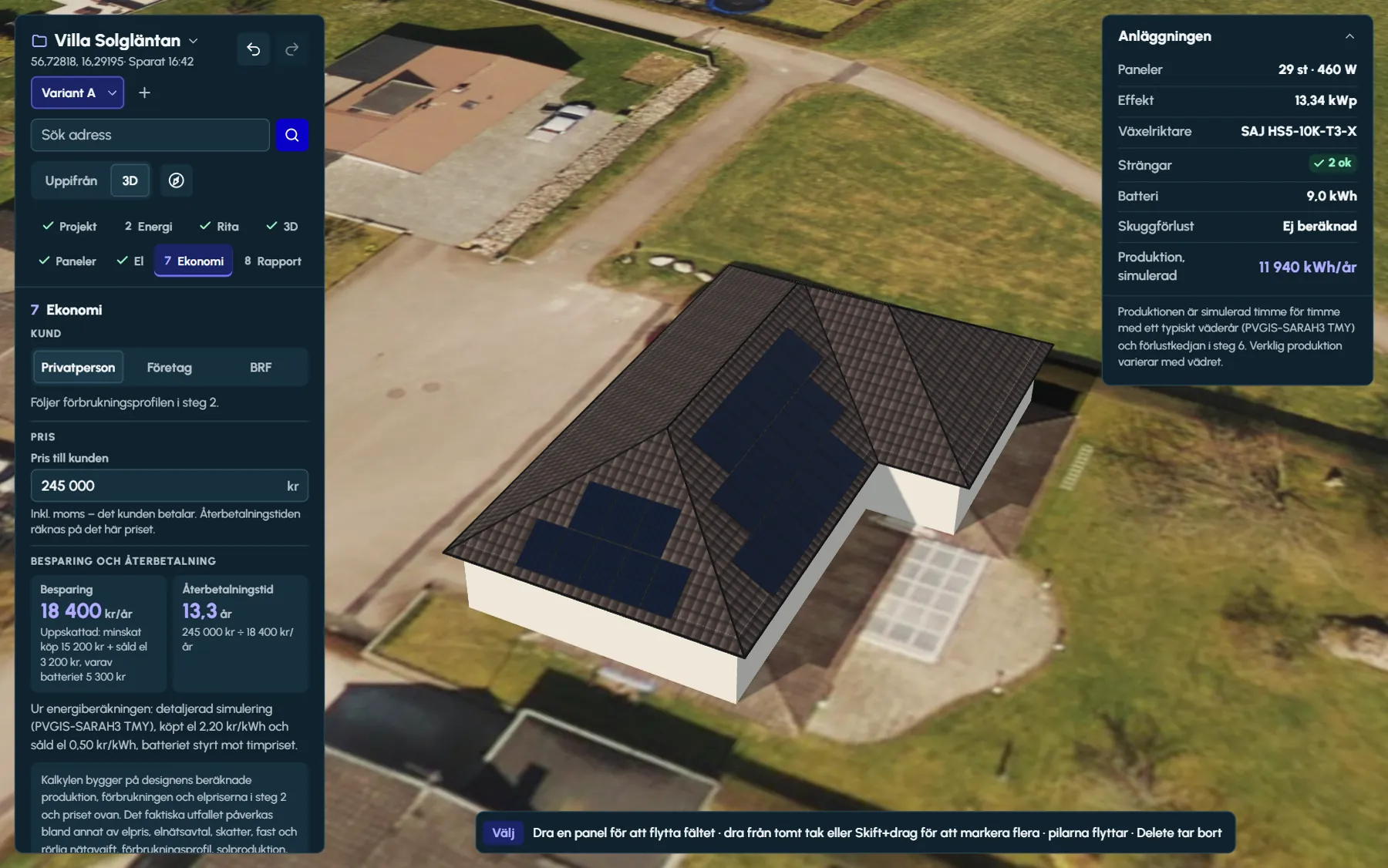
Customer type and VAT
The customer type follows the consumption profile in step 2 – a house becomes a private customer – and can be changed in step 7. Private customers and housing associations (in Sweden, tenant-owner associations) are calculated including VAT, businesses excluding VAT. The help text below the price tells you which applies.
For a business, you also enter the electricity prices in step 2 excluding VAT, so the savings are calculated on the same basis as the price.
The price on one line
Enter what the customer pays for the whole system in the field Price to the customer. It is the only amount the designer needs: no line items and no price list to keep up to date. An empty field means the project has no price, and then no payback period is shown.
The designer does not calculate any deductions. Sweden’s green technology tax deduction and other subsidies belong in the quote, not in the design.
How the payback period is calculated
Payback period = price to the customer / savings per year- Savings per year = reduced grid import + exported electricity, calculated hour by hour against the consumption and the electricity prices in step 2.
- With a battery, the battery’s share is included and shown separately below the figure: of which the battery.
- The payback period is calculated without interest and without price changes. This is stated in the box below the figures in step 7 and on the cover of the PDF report.
The savings come from the energy calculation
Reduced grid import is the electricity the household no longer has to buy – solar power used directly or via the battery – multiplied by the purchase price. Exported electricity is the surplus multiplied by the export price. Together they make up the savings compared with buying all electricity from the grid.
The savings are calculated with the same yield that step 8 shows – the simulation with a weather year, PVGIS or the standard estimate – against the customer’s consumption and the electricity prices in step 2, with the battery you chose in step 6. If the battery is controlled by hourly price, its contribution is calculated hour by hour against the spot prices in the bidding zone.
A trial battery in the energy results is not included in the economics, because it is not part of the price. Choose the battery in step 6 and it is included.
Below the figures, a box sets out what the calculation is based on and what affects the outcome: electricity price, grid contract, taxes, fixed and variable network charges, consumption profile, solar yield, battery power and efficiency, degradation and financing.
Compare variants of the same house
Create a variant as a copy of the one you have, or with an empty roof and the same products – up to eight per project. The house, the consumption and the electricity prices are shared. Panels, layout, strings, inverter, battery, mounting and shading analysis are separate for each variant.
The comparison in step 8 puts the variants side by side: number of panels, system size, panel, inverter, battery, annual yield, specific yield, PR, self-consumption, self-sufficiency, price, savings and payback period. On every row with figures, the variant with the highest or lowest value is marked – highest yield, lowest price, shortest payback period. Click a variant to show it.
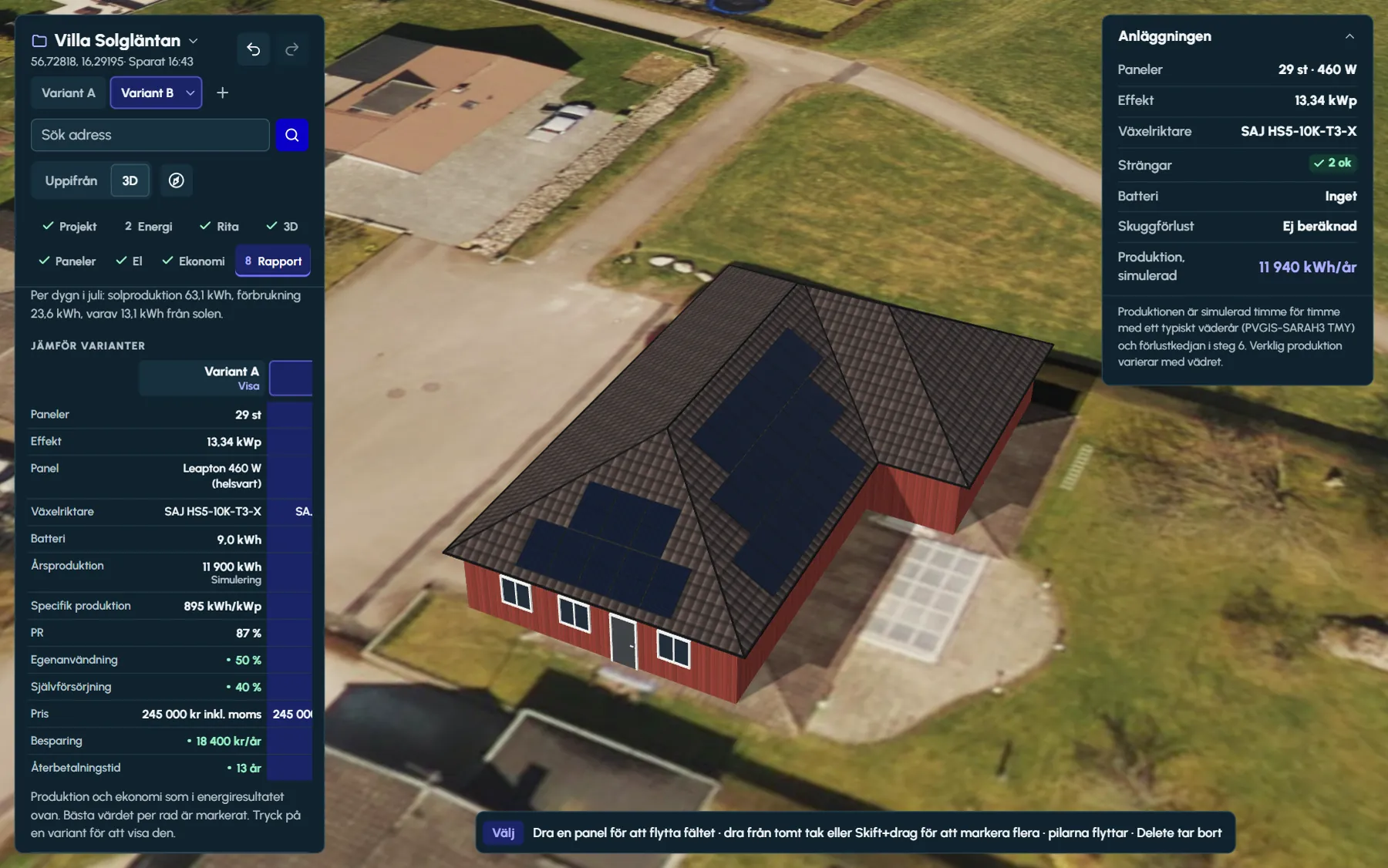
The same price across the whole project
- The summary in step 8 shows the price for the system, including or excluding VAT depending on the customer type, and a button back to step 7.
- The comparison calculates each variant’s payback period from the price.
- The PDF report shows the payback period on the cover and in the section on energy and economics.
- If you change the price in step 7, the rest follows.
Good to know
- The savings are recalculated once the energy data is complete – the weather year, the horizon and PVGIS are fetched one after another – so steps 7 and 8 show the same figures.
- The savings are shown rounded to the nearest hundred kronor per year, and the payback period to one decimal place.
- Every change to the price or the customer type is a separate step that can be undone.
- Below the savings, the designer states which yield they are based on and which electricity prices apply, so you can see what lies behind the figure.
Questions and answers
Questions and answers
Does Ritwerk calculate Sweden’s green technology tax deduction?
No. The designer does not calculate any deductions. The price to the customer is the amount you enter in step 7, and deductions such as the green technology tax deduction belong in the quote.
How is the payback period calculated?
As the price to the customer divided by the estimated savings per year, without interest or price changes. The savings are reduced grid import plus exported electricity, calculated hour by hour.
Why is the price for a housing association shown including VAT?
The designer calculates private customers and housing associations including VAT, and businesses excluding VAT. The customer type follows the consumption profile in step 2 and can be changed in step 7.
Can I compare two solutions for the same customer?
Yes. Create a variant of the design, as a copy or with an empty roof, and compare yield, self-consumption, savings and payback period side by side in step 8 or in the PDF report.
Why is no payback period shown?
It is calculated when there is a price in step 7 and savings to calculate from. Without panels or a battery in the design, there are no savings.
Read next
- Battery sizing for solar PVSelf-consumption, hourly readings, the knee where the next kWh adds less, hourly prices and backup power.
- Ritwerk vs Solar Monkey and EturnityTwo quoting tools for installers, now in one company, against a solar designer that calculates the loads.
- Energy and batteryConsumption profile or hourly readings, PVGIS 5.3, an hour-by-hour simulation and the battery sized against hourly prices.
- PDF customer reportCover with a 3D view, plan drawing, shading, yield and economics – short, standard or full.
Try it on a real roof.
The designer opens in your browser, with no account. Search for an address and start drawing.